如何使用Mybatis操作blob类型的数据方法介绍
一、写入Blob
1.1 操作步骤
- 获取文件的byte类型数组
- 直接将此byte[]作为参数插入到数据库即可(前提数据库相应的字段类型要为Blob)
1.2 实例
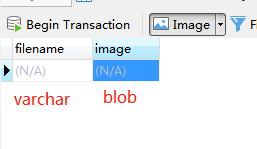
- (2)接口 和 实现类(基于SpringBoot搭建的mybatis)
1
2
3
4
5
|
@Mapper
public interface FileMapper {
void addFile(@Param("filename") String filename, @Param("image") byte[] image);
}
|
1
2
3
4
5
6
7
8
9
10
11
|
@Service
public class FileServiceImp implements FileMapper {
@Autowired
FileMapper fileMapper;
@Override
public void addFile(String filename, byte[] image) {
fileMapper.addFile(filename, image);
}
}
|
1
2
3
4
5
6
7
8
9
10
11
| <?xml version="1.0" encoding="UTF-8" ?>
<!DOCTYPE mapper
PUBLIC "-//mybatis.org//DTD Mapper 3.0//EN"
"http://mybatis.org/dtd/mybatis-3-mapper.dtd">
<mapper namespace="com.letere.dao.FileMapper">
<insert id="addFile">
insert into `filetest`(filename, image)
value (#{filename}, #{image})
</insert>
</mapper>
|
1
2
3
4
5
6
7
8
9
10
11
12
13
14
15
16
17
18
19
20
21
22
23
24
25
26
| @SpringBootTest
class CodeTests {
@Autowired
FileServiceImp fileServiceImp;
@Test
void addFileTest() throws Exception {
File file = new File("./src/main/java/com/letere/林克.jpg");
FileInputStream fis = new FileInputStream(file);
String filename = file.getName();
long length = file.length();
byte[] image = new byte[(int)length];
fis.read(image);
fileServiceImp.addFile(filename, image);
fis.close();
}
}
|
二、读取Blob数据
2.1 方法一
- 将要读取的数据封装为一个JavaBean,Blob数据对应的Java类型为byte[]
1
2
3
4
5
6
7
8
|
@Data
@AllArgsConstructor
@NoArgsConstructor
public class FileBean {
private String filename;
private byte[] image;
}
|
1
2
3
4
5
|
@Mapper
public interface FileMapper {
FileBean readFile1();
}
|
1
2
3
4
5
6
7
8
9
10
11
|
@Service
public class FileServiceImp implements FileMapper {
@Autowired
FileMapper fileMapper;
@Override
public FileBean readFile1() {
return fileMapper.readFile1();
}
}
|
1
2
3
4
5
6
7
8
9
10
11
12
13
14
15
| <?xml version="1.0" encoding="UTF-8" ?>
<!DOCTYPE mapper
PUBLIC "-//mybatis.org//DTD Mapper 3.0//EN"
"http://mybatis.org/dtd/mybatis-3-mapper.dtd">
<mapper namespace="com.letere.dao.FileMapper">
<select id="readFile1" resultType="com.letere.bean.FileBean">
select *
from `filetest`
limit 1
-- 为了方便测试,暂时只查询一条数据
-- 如果需要查询多条数据,只需在接口和实现方法的返回类型改成List集合来封装即可,resultType不用修改
</select>
</mapper>
|
1
2
3
4
5
6
7
8
9
10
11
12
13
14
15
16
17
18
19
20
21
22
| @SpringBootTest
class CodeTests {
@Autowired
FileServiceImp fileServiceImp;
@Test
public void readFile1() throws Exception{
FileBean fileBean = fileServiceImp.readFile1();
String filename = fileBean.getFilename();
byte[] image = fileBean.getImage();
FileOutputStream fos = new FileOutputStream("./" + filename);
fos.write(image);
fos.close();
}
}
|
2.2 方法二
- 利用resultMap来封装从数据库中读取的数据,不用JavaBean来封装,封装为一个Map集合
1
2
3
4
5
|
@Mapper
public interface FileMapper {
Map readFile2();
}
|
1
2
3
4
5
6
7
8
9
10
11
|
@Service
public class FileServiceImp implements FileMapper {
@Autowired
FileMapper fileMapper;
@Override
public Map readFile2() {
return fileMapper.readFile2();
}
}
|
1
2
3
4
5
6
7
8
9
10
11
12
13
14
15
16
17
18
19
20
| <?xml version="1.0" encoding="UTF-8" ?>
<!DOCTYPE mapper
PUBLIC "-//mybatis.org//DTD Mapper 3.0//EN"
"http://mybatis.org/dtd/mybatis-3-mapper.dtd">
<mapper namespace="com.letere.dao.FileMapper">
<resultMap id="fileType" type="map">
<result column="filename" property="filename" javaType="String" />
<result column="image" property="image" jdbcType="BLOB" javaType="_byte[]"/>
</resultMap>
<select id="readFile2" resultMap="fileType">
select *
from `filetest`
limit 1
-- 为了方便测试,暂时只查询一条数据
-- 如果需要查询多条数据,只需将接口和实现方法的返回值类型给该成用List封装map的集合,resultType不用修改
</select>
</mapper>
|
1
2
3
4
5
6
7
8
9
10
11
12
13
14
15
16
17
18
19
20
21
22
| @SpringBootTest
class CodeTests {
@Autowired
FileServiceImp fileServiceImp;
@Test
public void readFile2() throws Exception{
Map map = fileServiceImp.readFile2();
String filename = (String) map.get("filename");
byte[] image = (byte[]) map.get("image");
FileOutputStream fos = new FileOutputStream("./" + filename);
fos.write(image);
fos.close();
}
}
|