关于视频vue+springboot个人博客开发一些技巧的总结
视频地址:https://www.bilibili.com/video/BV1PQ4y1P7hZ
1 后端结果集封装
- 可以将后端要返回给前端的数据,封装在一个类中,该类有以下参数“code, message, data”。code为状态码,message为向前端的返回信息,data为要向前端返回的内容
- 并且为了方便调用,可以在该类创建静态方法,直接调用,不用创建对象后再调用
1
2
3
4
5
6
7
8
9
10
11
12
13
14
15
16
17
18
19
20
21
22
23
24
25
26
27
28
29
| @Data
public class Result {
private int code;
private String message;
private Object data;
private Result(int code, String message, Object data) {
this.code = code;
this.message = message;
this.data = data;
}
public static Result result(int code, String message, Object data) {
return new Result(code, message, data);
}
public static Result success(Object data) {
return result(200, null, data);
}
public static Result failure(String message) {
return result(400, message, null);
}
}
|
2 后端分页方法
1
2
3
4
5
6
|
@Mapper
public interface BlogMapper {
List<Blog> getListByPage(@Param("start") Integer start, @Param("limit") Integer limit);
}
|
1
2
3
4
5
6
7
|
<select id="getListByPage" resultType="com.letere.bean.Blog">
select *
from blog
order by `id` desc
limit #{start}, #{limit}
</select>
|
1
2
3
4
5
6
7
8
9
10
11
12
|
@Service
public class BlogService implements BlogMapper {
@Autowired
BlogMapper blogMapper;
@Override
public List<Blog> getListByPage(Integer currentPage, Integer limit) {
Integer start = (currentPage - 1) * limit;
return blogMapper.getListByPage(start, limit);
}
}
|
3 前端登录异常处理
- 一般处理方式是等数据axios请求完后,在then中做相应的逻辑处理
- 新的思路是可以通过axios的拦截器进行处理
1
2
3
4
5
6
7
8
9
10
11
12
13
14
15
16
17
18
19
20
21
22
23
24
25
| import Axios from "axios";
import Element from "element-ui"
export function request(config) {
const instance = Axios.create({
baseURL: "/api"
});
instance.interceptors.request.use(config => {
return config;
})
instance.interceptors.response.use(res => {
if(res.data.code === 200) {
return res;
} else {
Element.Message.error(res.data.message, {duration: 3*1000});
return Promise.reject('reason: ' + res.data.message);
}
});
return instance(config);
}
|
4 页面markdown处理
4.1 markdown编辑器
- 安装后的配置(记得在’main.js’中导入配置文件)
1
2
3
4
5
6
| import Vue from "vue";
import MavonEditor from 'mavon-editor';
import "mavon-editor/dist/css/index.css"
Vue.use(MavonEditor);
|
- 使用方法
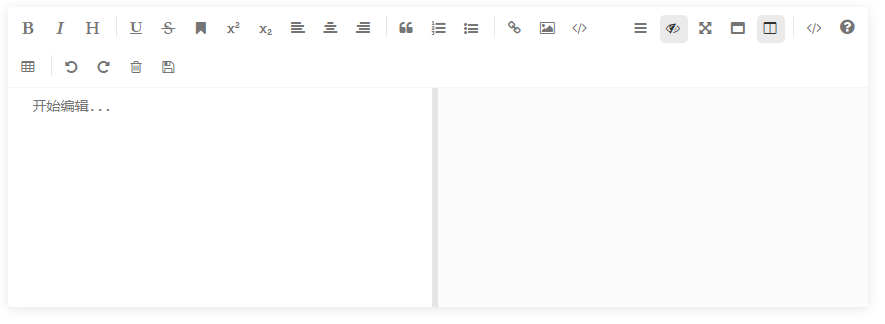
- 页面使用标签
<mavon-editor v-model=""></mavon-editor>即可
4.2 页面渲染markdown语法
- 需要安装
npm install --save markdown-it
1
2
3
4
5
| import MarkDownIt form 'markdown-it'
const md = new MarkDownIt();
const html = md.render("markdown语法内容");
|
1
2
|
<div v-html="html语法内容"></div>
|
4.3 使用markdown样式
- 需要安装
npm install github-markdown-css
1
| import "github-markdown-css/github-markdown.css"
|
1
2
|
<div class="markdown-body" v-html=""></div>
|